
아래의 tutorial을 조금 수정하여 작성한 스크립트이다.
https://sites.google.com/site/appsscripttutorial/advanced-examples/load-list-box-from-sheet
아래는 listbox에 들어갈 item 을 가져올 sheet이다.
https://docs.google.com/spreadsheet/ccc?key=0AoDfiFwtkfF4dC13YXU4alMzNjcwMm55d1Fibll2TkE#gid=0
function onOpen(){

  var menu = [{name: 'listBox', functionName: 'listBox_view'}];
  SpreadsheetApp.getActive().addMenu('listBoxView', menu);

}

function listBox_view() {

//spreadsheet key is neede to access the spreadsheet.
//Make sure you own the spreadsheet which you are using.
//You can use public spredsheet also
var itemSpreadsheetKey = '0AoDfiFwtkfF4dC13YXU4alMzNjcwMm55d1Fibll2TkE';

//Open the spreadsheet and get the sheet objects
var openedSS = SpreadsheetApp.openById(itemSpreadsheetKey);
var sheetList1 = openedSS.getSheetByName("List1");//Spreadsheet must match with sheet name
var sheetList2 = openedSS.getSheetByName("List2");//Spreadsheet must match with sheet name

   //get the document
  var doc = SpreadsheetApp.getActiveSpreadsheet();

  var app = UiApp.createApplication();
  var panel = app.createVerticalPanel();

  var label1 = app.createLabel('This is first List Box').setStyleAttribute('color', '#006400');
  var listBox1 = app.createListBox().setWidth('150px');
  numItemList1 = sheetList1.getLastRow()-1;//-1 is to exclude header row
  //get the item array
  list1ItemArray = sheetList1.getRange(2,1,numItemList1,1).getValues();
  //Add the items in ListBox
  for(var i=0; i<list1ItemArray.length; i++){
    listBox1.addItem(list1ItemArray[i][0])
    Logger.log(list1ItemArray[i][0]);
  }

  //Similarly for Second List Box
  var label2 = app.createLabel('This is Second List Box').setStyleAttribute('color', '#8B0000');
  var listBox2 = app.createListBox(true).setWidth('150px');
  numItemList2 = sheetList2.getLastRow()-1;//-1 is to exclude header row
  list2ItemArray = sheetList2.getRange(2,1,numItemList2,1).getValues();
  for(var i=0; i<list2ItemArray.length; i++){
    listBox2.addItem(list2ItemArray[i][0])
  }
  panel.add(label1)
    .add(listBox1)
    .add(label2)
    .add(listBox2);
  app.add(panel);
  Logger.log(panel);

  doc.show(app);
}
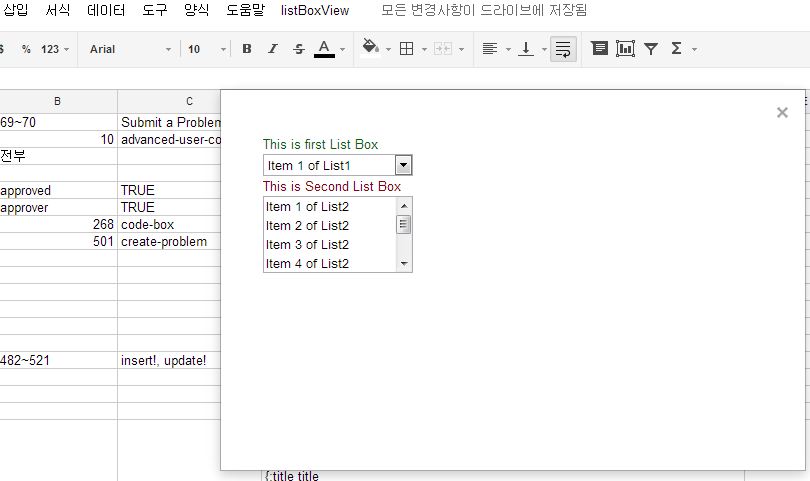
위의 코드를 원하는 spreadsheet 에 등록하면, onOpen 함수에 의해 메뉴형태로 등록된다. 메뉴를 누르면, panel에 가져온 리스트를 보여준다.
panel은 SpreadsheetApp 에만 show 매서드를 통해 보여질 수 있는 것으로 보인다. DocumentApp에서는 어떻게 나타내는지 모르겠다. 여러 시도를 해봤으나, listbox 자체를 append 하는 건 없고, listboxitem을 appending 하는 매서드 밖에 찾지 못했다.
아무튼 onOpen 함수도 특정 명령 외에는 문서 시작시에 실행하지 못하는 것으로 보이는데, 확인해 봐야겠다.











댓글 달기