메뉴 건너뛰기

app

[WP7] 애플리케이션바 제어하기, pushpin icon

suritam92013.03.04 03:02조회 수 2432댓글 0

  • 2
    • 글자 크기

http://www.developer.nokia.com/Community/Wiki/Application_Bar_for_Windows_Phone


위 주소에 매우 잘 나오고, 예제도 잘 되어 있다.


그런데, 아이콘이 안 나오는 경우가 있다.


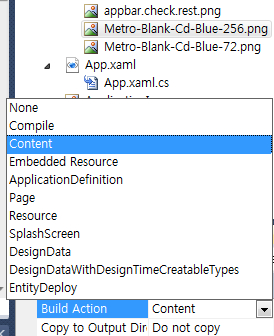
6. In the Properties window, set the property Build Action to content and Copy to Output Directory to Copy if Newer. Setting the Build Action to content is necessary for the image to show up on the application bar.


위의 글을 잘 이해하고 이행해야 한다.


iconview.png


pushpin contents에 icons 로 


using System.Windows.Media.Imaging;


~~~~~~~~~~~~~~~~~~~~`


Uri imgUri = new Uri("icons/appbar.cancel.rest.png", UriKind.RelativeOrAbsolute);

                            BitmapImage imgSourceR = new BitmapImage(imgUri);

                            ImageBrush imgBrush = new ImageBrush() { ImageSource = imgSourceR };


                            pp.Background = new SolidColorBrush(Colors.Transparent);

                            pp.Content = new Rectangle()

                            {

                                Fill = imgBrush,

                                Height = 64,

                                Width = 64

                            };


배경을 Transparent로 하면, 깔끔하게 나온다.

suritam9 (비회원)
  • 2
    • 글자 크기
[WP7] 언어 문제와 위치 정보 사용 허용 질의하기 (by suritam9) [WP7] 앱 설정 tip 2가지와 현재 위치 가져오기 (by suritam9)

댓글 달기

suritam9
2013.04.25 조회 6271
suritam9
2013.04.04 조회 2306
suritam9
2012.09.14 조회 2619
suritam9
2012.06.24 조회 2476
suritam9
2012.06.24 조회 2891
suritam9
2012.06.24 조회 2673
suritam9
2012.06.22 조회 2678
박영식
2011.09.22 조회 2655
박영식
2011.09.21 조회 2593
박영식
2011.02.18 조회 3082
박영식
2010.09.29 조회 4946
첨부 (2)
ApplicationBarDemo.zip
73.7KB / Download 47
iconview.png
11.8KB / Download 55
위로