
파노라마 부분에서 처음부터 웹에서 엑서스 하는 부분을 호출하거나, 지도 등을 표현하기, reload가 필요한 경우, 인덱스를 활용할 필요가 있다.
파노라마가 있는 XAML 파일(MainPage.xaml) 에
<controls:Panorama x:Name="PanoramaBox" Title="K-Lisp" SelectionChanged="Panorama_SelectionChanged">
위와 같이 이벤트를 받을 함수를 적어 준다.
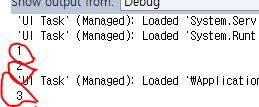
그리고, cs(MainPage.xaml.cs) 파일에 아래와 같이 함수를 서술하면, output을 확인하면서, 현재 index에 따라 동작을 제어할 수 있다.
private void Panorama_SelectionChanged(object sender, System.Windows.Controls.SelectionChangedEventArgs e)
{
System.Diagnostics.Debug.WriteLine(PanoramaBox.SelectedIndex);//output 에 현재 index 출력
if (PanoramaBox.SelectedIndex == 1)
{
//// 동작 상세
}
}

처음 index는 0이고, 하나씩 오른쪽으로 가면, 1, 2, 3 을 볼 수 있다.
http://pastebin.com/P5za9rc9 를 참조했다.









댓글 달기